TopxAI Desktop: what it solves and how a message moves through it
· desktop, agent, claude-code, codex, topxai
No API key to set up, one chat across catalogue models, Claude Code and Codex. What the TopxAI desktop client does, how it is built and what it can't do yet.
TopxAI Desktop is the desktop client for TopxAI. The current version is 1.55.0, and it runs on Apple silicon Macs with macOS 15 or later. Sign in through the browser and you can chat, edit code and work on files with the models of the catalogue, with no API key to set up. If Claude Code or Codex is installed on the computer, it can join too, and a chat can switch between them and the catalogue.
This post is for people deciding whether to install it, and one section lists what it can't do yet.
What it solves
Using TopxAI's models used to mean creating a key and choosing a route, then changing the API address in each tool. The site has more than a dozen setup guides, roughly one per tool. The desktop client drops that step. On first launch it opens the site's authorization page, and once you confirm, the app sends requests with your account's built-in auto key. Balance, top-ups and usage are in the app.
Picking a tool often means picking the models behind it, and trying another vendor means another window. Here each chat has a main model you can change at any time, including between catalogue models, Claude Code and Codex.
Some work doesn't fit in one reply, like a research report or a feature that touches many files. The client rates a request's difficulty first and breaks hard ones into steps. The plan and its progress live in a run record, so a recovered run continues where it stopped. A turn running on a TopxAI model also survives a window reload.
Getting an agent to edit Word files, calculate in Excel or drive a browser usually means installing Python, Node.js, LibreOffice and a browser first. The package carries all of them, so the built-in tools need no separate install. The cost is size: about 1.7 GB to download and about 4.2 GB installed.
Providers and models
A provider is where models come from. TopxAI is one, and its catalogue comes from the site's /api/pricing, so a new model appears without an app update. Claude Code and Codex use native drivers: the app runs the program installed on your computer with its own sign-in. Grok has a dedicated driver, and other ACP-compatible programs can connect as well.
Subagents have their own model setting. They can choose automatically (a fast model rates the task, then Jev picks a model or Agent), follow the chat, use a model you pick, or run on an Agent installed on this computer. The Agent library in Settings holds Agents you define, each with a role, a model and a system prompt.
Switching has one restriction. In 1.55.0, a chat that has used a GLM or Abliterated model keeps its context on that model: it can't switch to another model or delegate to one. The next version relaxes this. Only the two Abliterated models will keep the rule, they can switch to each other within one provider, and official GLM models will no longer be restricted.
API providers, which connect any service with an OpenAI or Anthropic API using your own key, also arrive in the next version.
How hard requests run
When a new request comes in, a cheap model writes a brief, and Jev rates the work from 1 to 5. The turn waits at most two seconds for that rating. If it doesn't arrive, the turn runs as usual.
At 4 or above the request is orchestrated. A supervisor model writes the plan, executor Agents carry out the steps in parallel as delegated tasks, and the supervisor checks each result, replans when needed and writes the summary. This triage runs only on TopxAI's own loop. Claude Code and Codex have their own loops and don't pass through it.
You can pause, edit or stop a run from the plan sidebar. The Execution panel lists which models ran and what they cost. Those amounts are local estimates, and the usage in your account has the billed figures.
A long run has a default time threshold of 240 minutes and no spending cap, and an unknown cost won't stop it, so check your balance before you start one.
Coming back later
An agent can park a chat with check_back_later for up to 30 days and resume it in the same provider, model and permission mode.
An on-duty Agent is the long-term version. It binds an Agent from your library to one long-lived chat, with a goal, done criteria and a token budget per wake. Its five capability switches (browser, files, shell, screen control, external accounts) start off, and you turn on what it needs. It wakes on a check-back, a schedule or an event in its inbox. With Telegram paired, you message it with @<duty> or /duty, and replies and tool approvals happen in Telegram too.
All of this needs the computer awake. A laptop that closes its lid or sleeps stops its on-duty Agents.
Tools and memory
Bundled skills cover Word, Excel, PDF, PowerPoint, Blender, data analysis and design work. More can be installed from a public directory: downloads are checked, and a failed update keeps the existing version. The connector directory signs in to third-party services with OAuth, and you can add local MCP servers.
A companion extension, exported from the app, goes into Chrome or Edge and gives each chat its own tabs. To operate your Mac, the app needs the Accessibility and Screen Recording permissions, which you grant in System Settings. Opening the app doesn't grant them. Image and video generation shows progress and a preview in the chat and saves the result on your computer. The Design canvas builds screens beside the chat.
Memory is based on Claude-Mem and stays on this computer. Automatic capture is off until you turn it on in Settings, where you can also review and delete what was saved. Coding workflows from ECC are built in and managed under Settings, Advanced. The app sends no product telemetry.
How a message moves through it
The diagram follows one message from top to bottom. If the text is too small, open the full-size image.
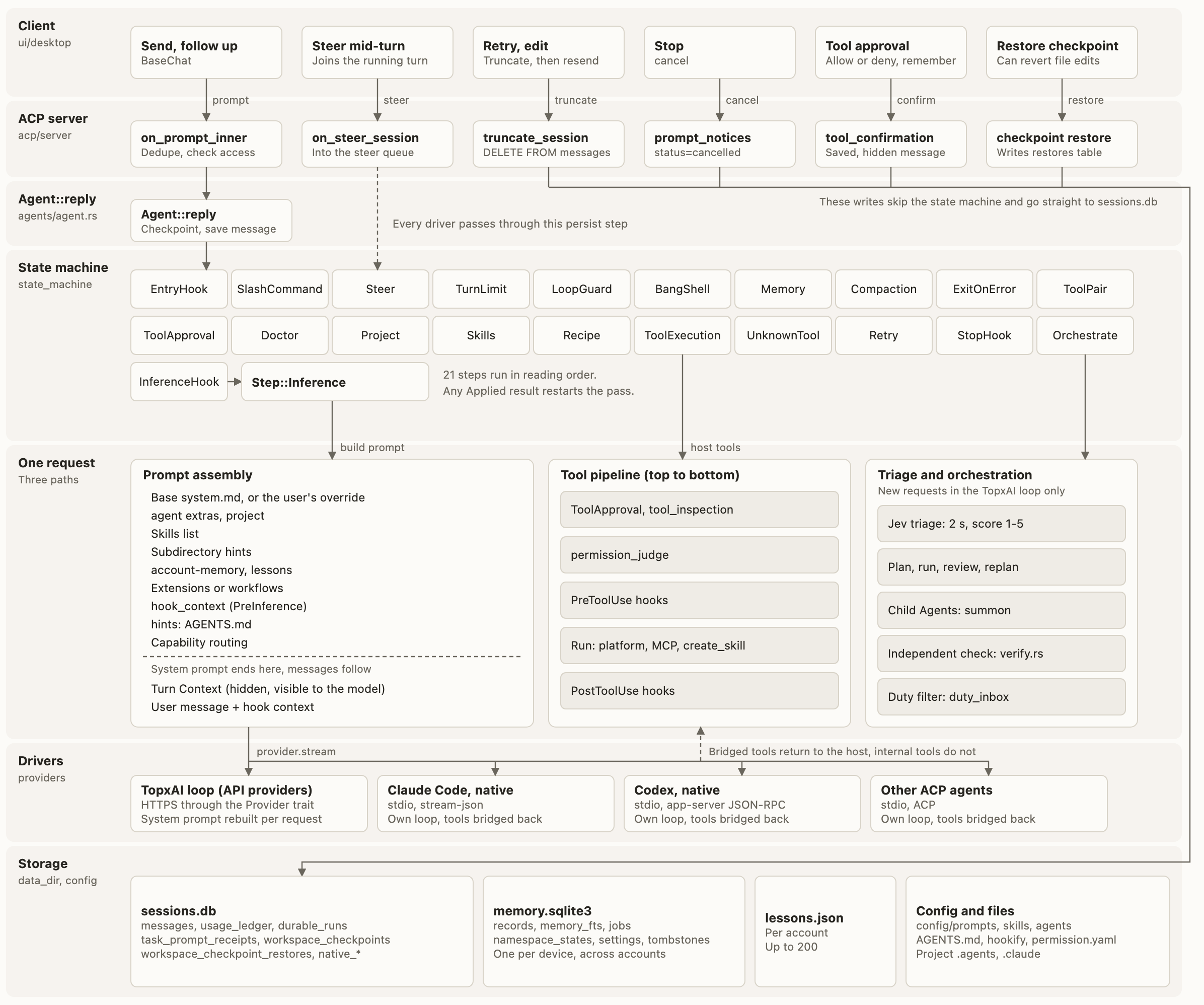
The window is Electron. Each window starts its own topxai serve backend and talks to it over ACP. The backend is written in Rust and built on an Apache-2.0 open-source agent.
When you send a message, the ACP server removes duplicates, checks access and hands it to Agent::reply, which takes a checkpoint, saves the message and runs the state machine.
The state machine is a row of 21 operations. Hooks, slash commands, steering, compaction, tool approval, tool execution, retries and orchestration each check in turn whether they have work to do. If one does, the pass starts over. When none does, one model request goes out. This is the client's only loop, and new loop behaviour is written as one of these operations.
Not everything goes through it. Retry and edit first delete the later messages and then send again. Stop, tool approval and restoring a checkpoint write straight to sessions.db.
Before a model request, the prompt is assembled from the base system.md (or your override), Agent extras, project information, the skills list, memory, extensions, hook context and AGENTS.md. Tool calls take a separate pipeline: approval and inspection, the permission judge, PreToolUse hooks, execution and PostToolUse hooks.
Then the drivers split. TopxAI and API providers use HTTPS, with the system prompt rebuilt for each request. Claude Code uses stream-json over stdio, Codex uses app-server JSON-RPC over stdio, and Grok and other ACP agents use ACP over stdio. These three kinds have their own loops, and only bridged tools come back to TopxAI's pipeline.
Chats and memory stay on your computer. sessions.db holds messages, the usage ledger and run records, memory.sqlite3 holds memory, and prompts, skills and Agents are plain files in the configuration directory.
What it can't do yet
There is no Intel or Windows build. Hands-on testing has been done on macOS 27 only. The macOS 15 minimum comes from the build settings and hasn't been checked on a macOS 15 machine.
Sign-in credentials are in a local file with restricted permissions, not in the system keychain.
Getting started
Download the DMG from the downloads page, open it and drag TopxAI Desktop into Applications. The app is signed with an Apple Developer ID and notarized, so on first launch macOS only asks whether to open an app downloaded from the Internet. Check that it names TopxAI Desktop and click Open. Then choose a display language and sign in through the browser.
To verify the download, every release includes a SHA256SUMS file, and the steps are in the installation guide. If something goes wrong, email support@topxea.com with the app version, your macOS version and the error message.
Related
- TopxAI Desktop downloads
- What TopxAI is
- Jev (TypeSafe System One)
- Create an API key and choose a route
- How requests are billed
- Reading your usage log
- What we fixed in the relay: Claude Code images, fairer billing, fewer failed requests
- GPT-6.1 Terra on TopxAI
- Moving to deepseek-flash-Abliterated on TopxAI
Other languages: 简体中文